Tshirt
Manor Dem Tshirt
Manor Dem Jersey Pack (Addon) - GTA V / FiveM
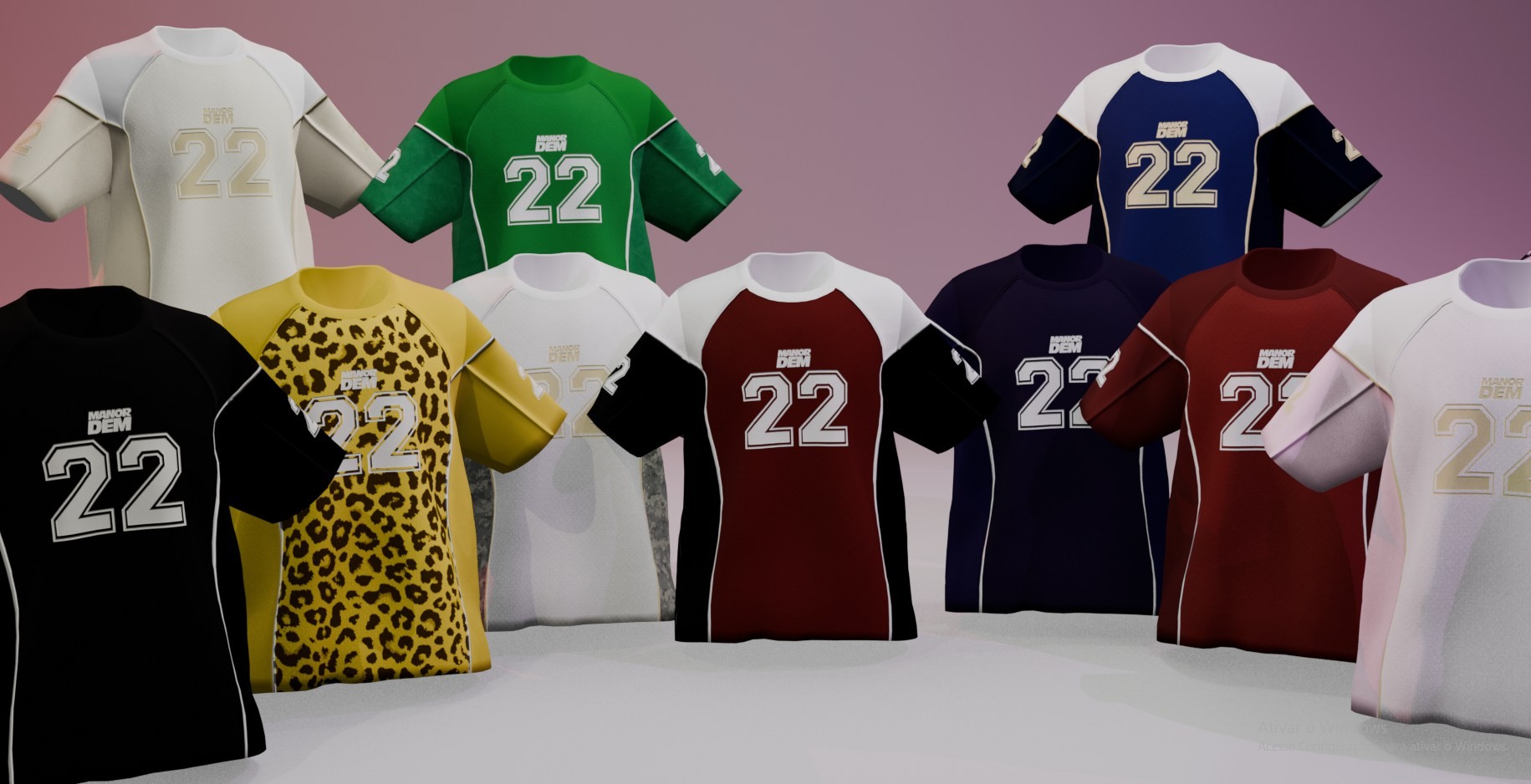
Take your character's style to the next level with the Manor Dem Jersey Pack, a collection of sporty short-sleeve jerseys featuring a clean athletic design, bold color combinations, and recognizable Manor Dem branding. Each jersey includes the signature number 22 and detailed panel lines that give the collection a professional teamwear appearance.
The pack includes multiple color variations, ranging from classic and neutral styles to bold statement designs. Choose from black, white, green, blue, navy, burgundy, red, yellow leopard print, and additional two-tone combinations shown in the collection.
Features
- Optimized 3D jersey models for GTA V / FiveM.
- Multiple color variations for different character styles.
- Available colorways include black, white, green, blue, navy, burgundy, red, yellow leopard print, and two-tone designs.
- Detailed short-sleeve sports jersey construction.
- Signature Manor Dem branding and number 22 graphics.
- Clean athletic panel lines and contrasting sleeve details.
- High-quality textures with sharp logos, numbers, and color separation.
- Ideal for RP servers, sports outfits, streetwear looks, and character customization.
- Organized addon structure for easy installation and server management.
Pack Content
- Manor Dem jerseys in multiple colorways:
- Black with white graphics.
- White with light gold graphics.
- Green with white graphics.
- Royal blue with white and gold graphics.
- Navy blue with white graphics.
- Burgundy and white.
- Red and white.
- Yellow leopard print with black sleeves.
- Additional white and two-tone variations.
- Custom clothing files prepared for addon usage.
- Organized folders and files for straightforward installation.
Installation - Single Player GTA V
1. Open your GTA V main directory.
2. Navigate to: mods/update/x64/dlcpacks/
3. Create a new folder, for example: manordemjersey
4. Place the mod files inside the new folder.
5. Navigate to: mods/update/update.rpf/common/data/
6. Open dlclist.xml with a text editor.
7. Add the following line:
dlcpacks:/manordemjersey/
8. Save the file and launch the game.
Installation - FiveM
1. Open your FiveM server directory and navigate to: resources/
2. Create a new resource folder, for example: manordemjersey
3. Place all pack files inside the resource folder.
4. In your server.cfg, add:
ensure manordemjersey
5. Save the configuration and restart your server.
Notes
- A clothing menu, wardrobe script, or compatible clothing system may be required to access and equip the jerseys.
- Compatibility may vary depending on your server's clothing framework and resource setup.
- The pack is recommended for use with popular RP frameworks such as QB-Core and ESX, provided that the required clothing system is installed.
- Always create a backup of your game and server files before installing new content.
The Manor Dem Jersey Pack brings a complete teamwear look to your character. With multiple colorways, bold number 22 graphics, and a strong athletic identity, these jerseys are made for characters who want to stand out both on the street and on the field.